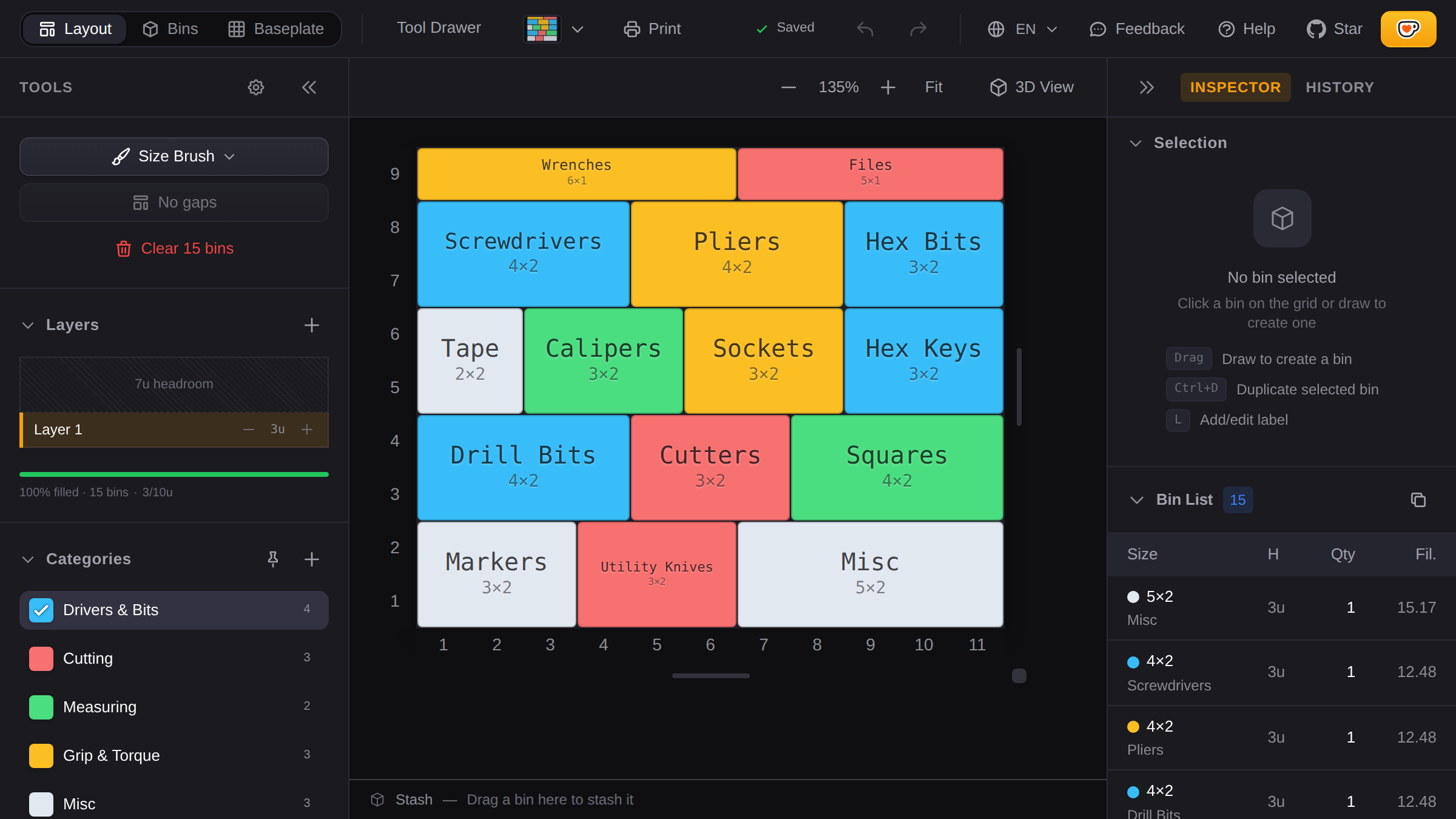
How to Plan a Gridfinity Drawer Layout
Printing without a plan wastes filament. You'll end up reprinting bins because you guessed wrong on sizes, leaving gaps you didn't want, or forgetting what you needed. This guide covers how to measure, plan, and get a print list before you start. If the system itself is new to you, start with what Gridfinity is and how it works.
Measure Your Drawer
Get the inside dimensions in millimeters. You need:
- Width - left to right
- Depth - front to back
- Height - bottom to top (clearance when closed)
Measure at a few spots. Drawers are rarely perfect rectangles, especially older furniture. Use the smallest measurements to be safe.
Convert to Grid Units
Gridfinity uses 42mm units. Divide and round down:
Width:  380mm ÷ 42 = 9.04 → 9 units
Depth:  260mm ÷ 42 = 6.19 → 6 units
A 9×6 grid is 378mm × 252mm. You'll have small gaps at the edges. That's fine. Baseplates don't need to fill every millimeter.
Figure Out What Goes In It
Most people skip this and regret it.
Take everything out of the drawer. Group it:
- Daily items
- Weekly items
- Stuff you forgot you own
The daily stuff needs to be accessible. The weekly stuff can go in back. The forgotten stuff might not need a bin at all.
Match Items to Bin Sizes
Rough guidelines:
| Items | Bin Size |
|---|---|
| M3 screws, small components | 1×1 with dividers |
| Pens, USB drives, batteries | 1×2 or 2×2 |
| Screwdrivers, pliers | 1×3 or 1×4 |
| Tape, glue bottles | 2×2 or 2×3 |
| Large tools | 3×3 or bigger |
Don't obsess over this. You can always print different bins later.
Plan the Layout
Open the tool and set your grid size. Drag to create bins. The tool won't let you overlap or go out of bounds.
Put frequently-used items near the front. When you open the drawer, what do you reach for first? That goes in front.
Group related items. Screwdrivers in one spot, measuring tools in another. You'll remember where things are.
Leave some empty space. Your collection will grow. A drawer that's 100% planned today is a problem tomorrow.
Use Layers for Tall Drawers
If your drawer has height clearance, you can stack bins vertically. Layer 1 is the bottom.
This works well for:
- Flat items on bottom (cables, small parts), taller bins on top
- Keeping electrical separate from mechanical
Keep heavy things on the bottom, frequently-used things on top.
Export Your Print List
When you're happy with the layout, export a print list:
- Every bin size and quantity
- Filament estimates in grams
- Search links for each size
Finding STL Files
You can generate custom bins directly with the built-in bin generator — choose your dimensions, base style, compartments, and export as STL, STEP, or 3MF.
For specialized bins (tool-specific holders, complex shapes), search community repositories:
- Printables - largest selection
- Thangs - good for finding similar designs
- MakerWorld - Bambu Lab community
Example search: "gridfinity 2x2 3U" finds 2×2 bins that are 3 height units tall.
Before You Print
Test with cardboard first
Cut cardboard to your bin sizes (42mm per grid unit) and arrange them in the drawer. If something feels wrong, you haven't wasted any filament.
Print one bin first
Before printing 20 bins, print one. Check the fit, check the height, and make sure you like the design. Adjust your printer settings if needed.
Check your clearance
Your tallest bin plus baseplate (about 5mm) needs to fit when the drawer closes. Measure this before committing to tall bins.
Common Mistakes
Too many tiny bins. A grid of 1×1 bins looks organized but is annoying to use. Larger bins with dividers are usually better.
Filling every square. This leaves no room for new items. Plan for 10-20% empty space.
Ignoring what you actually use. Don't organize around what you think you should have. Organize around what you reach for.
Worked Examples
Two drawers planned end-to-end, if you would rather follow one than start from a blank grid: a tool drawer for wrenches, bits and pliers, and a kitchen drawer for utensils and spices.