Gridfinity Generator
A free online Gridfinity generator for bins and baseplates, built into a drawer layout planner. Set the size, download STL, STEP, or 3MF. No account. Everything runs in your browser, nothing to install, and it works offline once loaded. Measure the drawer once, plan the whole layout, and generate every bin to fit: a combination standalone bin makers don't offer.
Open Bin Generator → Open Baseplate Generator →
What This Generator Makes
Gridfinity is a modular storage system designed by Zack Freedman. It defines a 42mm grid where bins click into baseplates. To actually use Gridfinity, you need both pieces: bins sized to your stuff, and baseplates sized to your drawer. This generator handles both.
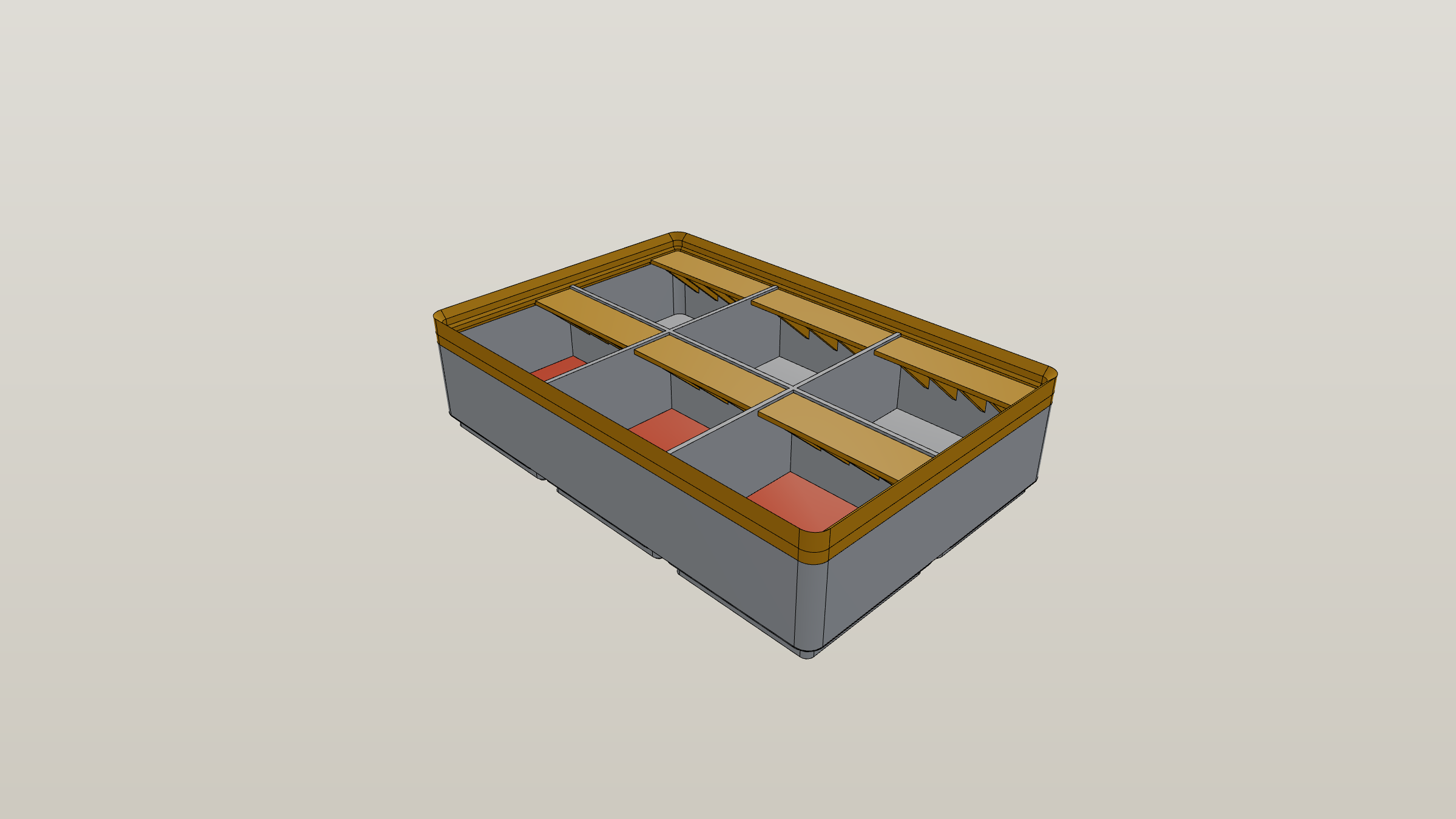
Bins are the open-top containers that hold your stuff. The bin generator lets you pick a size, choose a base attachment style (plain, magnet, screw, weighted, or flat), then layer on features — compartments to subdivide the interior, scoop ramps for easy access, label tabs for the back wall, wall cutouts for sliding things out sideways, floor inserts shaped to specific items (circles for batteries, hexagons for bits), and decorative wall patterns.
Baseplates are the grid that bins clip into. The baseplate generator lets you set the grid size, configure 6mm by 2mm magnet holes at every intersection, add per-side edge padding so the baseplate fits your drawer exactly, and split large baseplates into pieces that fit your printer bed automatically.
You can also use the generator's layout planner to lay bins out on a baseplate, drag them around, and export a print list of every bin you need. That's the third tool in the suite, but the bin and baseplate generators are the parametric workhorses.
How It Works
- Pick the generator. Open the bin generator if you're making storage bins, or the baseplate generator if you're making the grid they clip into.
- Set the dimensions. Width and depth in grid units (1 unit = 42mm). Height in units of 7mm for bins. Half-bin mode lets you go in 0.5 unit increments.
- Configure features. Toggle and adjust the parts you need. Defaults are sensible — you can ship a basic bin with two clicks.
- Preview in 3D. The render updates live as you change parameters. Drag to rotate, scroll to zoom, click again to deselect.
- Export. Download as STL, STEP, or 3MF. Large baseplates split into multiple files automatically.
- Slice and print. Open the file in your slicer of choice. Standard Gridfinity prints fine at 0.2mm layers with 15–20% infill.
Everything runs locally. Nothing is uploaded unless you explicitly create a shareable link.
Bin Generator: What You Can Configure
Dimensions
Width, depth, and height. Width and depth go from 0.5 to 16 grid units (21mm to 672mm). Height goes from 2 to 50 height units (14mm to 350mm). One height unit equals 7mm, which is the standard Gridfinity unit defined by Zack Freedman's original spec.
Base Attachment Styles
Six options for how the bin sits on a baseplate:
- Standard — the default Gridfinity socket. Works with all baseplates.
- Magnet — cavities for 6mm by 2mm magnets. Glue magnets in to keep bins from sliding.
- Screw — threaded holes for M3 inserts. Good for heavy bins or in vehicles.
- Magnet & Screw — both. Maximum hold for things you don't want moving.
- Weighted — thicker base for ballast without hardware.
- Flat — no socket at all. For when you want a bin shape but no Gridfinity attachment.
Compartments
Split the interior into a grid of up to 12 by 12 compartments. The generator builds the dividers automatically and adjusts wall thickness for the size you've chosen. Dividers can also be exported as separate removable pieces — useful when you want to reconfigure a bin without reprinting it.
Wall Features
Three wall features address different use cases:
- Wall cutouts — U-shape, scoop, or funnel notches on any of the four sides plus interior dividers. Lets you slide things out sideways or thread cables through.
- Scoop ramps — angled floor at the front so small parts collect at the front edge for easy pickup.
- Wall patterns — honeycomb or other decorative patterns for ventilated bins or just visual style.
Label Tabs
A small shelf on the back wall for label strips. Pick bracket support (lighter, prints faster) or solid support (more rigid). Configure the tab depth, width, and per-column alignment. Label tabs are nice for tool drawers where you want to mark what's in each bin without reading it.
Floor Inserts
Cavities cut into the bin floor in five shapes — rectangle, circle, hexagon, rounded rectangle, slot — with configurable depth and rotation. This is what you use to make a battery holder, a bit holder, an O-ring tray, or a screw sorter. Place up to 20 inserts per bin and configure each one independently.
Custom Shapes
Most bins are rectangles, but the generator also supports custom footprints via a cell mask. Switch to mask mode and paint cells on a half-bin grid — the bin becomes that shape. Useful for fitting awkward drawer corners or building L-shaped or T-shaped bins. The mask is preserved in shareable links.
Cutout Editor
For shapes that don't fit any preset, the cutout editor lets you draw freeform paths with a pen tool. Bezier handles let you make smooth curves; corner mode locks angles for straight cuts. Carve out the silhouette of a wrench, a multitool, or anything else — the generator creates the cavity automatically. The cutout generator covers every shape it can make, including imprints from an imported STL.
Baseplate Generator: What You Can Configure
Grid Size
Width and depth in grid units. The generator scales seamlessly from 1 by 1 up to drawer-sized baseplates of dozens of units per side.
Magnet Holes
Standard Gridfinity uses 6mm by 2mm round magnets at each grid intersection. The baseplate generator leaves them off by default; enable them if you want magnets. Magnets keep bins from sliding when the drawer opens or closes, which matters if you're carrying the drawer or running a tool truck.
Edge Padding
Drawers rarely measure to a clean multiple of 42mm. Edge padding adds extra material to each side of the baseplate so it fills the drawer end-to-end without wasted space. Padding can be different on each side, which lets you center the grid or push it toward one edge.
Print Bed Splitting
Set your printer's bed size and the generator splits large baseplates into pieces that fit. Each piece comes out aligned so they tile back together perfectly. Optional dovetail or tongue-and-groove connectors keep the pieces aligned during use.
Output Formats
Three export formats, picked for different downstream tools.
| Format | When to use it |
|---|---|
| STL | Standard 3D printing format. Open in any slicer. The default unless you have a specific reason to pick something else. |
| STEP | Parametric CAD format. Open in Fusion 360, FreeCAD, SolidWorks, Onshape, or any other CAD package. Useful when you want to combine a Gridfinity bin with custom geometry, or for clean editable surfaces. |
| 3MF | Modern format with metadata for color and material. Best paired with multi-material printers (Bambu A1 / X1, Prusa XL with toolchanger, MMU3). Slicers that support 3MF preserve per-feature color hints. |
All three formats are produced from the same source geometry, so dimensions and tolerances are identical regardless of which you pick. Pick by what your slicer or downstream tool prefers.
How It Compares
vs. Other Online Generators
Several browser-based Gridfinity generators exist, and the good ones share the same core: parametric bins, a live preview, an STL download, no install. If you're comparing them, the details that actually separate them are:
- Export formats. Every generator exports STL. Fewer export STEP (for continuing in CAD) and 3MF with color metadata (for multi-material printers). This one exports all three from the same geometry.
- Baseplates, not just bins. Drawers rarely measure a clean multiple of 42mm. Look for per-side edge padding and automatic print-bed splitting with alignment connectors — the features that turn a baseplate from a demo into something that actually fills your drawer.
- Half sizes. 0.5-unit increments matter more than they sound; they're how you fill the awkward last 21mm of a drawer.
- Offline and account requirements. Some generators are server-rendered, so they need a connection and can queue. This one generates locally in your browser and works offline as a PWA, with no account and no upload.
The structural difference is what surrounds the generator. Standalone generators make one bin at a time, and the drawer plan lives in your head or a spreadsheet. Here the bin and baseplate generators are built into a drawer layout planner: you measure the drawer once, lay out every bin visually, and each bin you generate already has the right footprint. When the layout is done, you export a print list covering every file in the drawer — no copying dimensions between tools.
vs. OpenSCAD scripts (kennethjiang, vector76, others)
OpenSCAD scripts have been the workhorse of the Gridfinity community since the project started. They are powerful and free. They are also code — to change a bin's height, you edit a parameter in a text file and re-run the renderer. The render takes seconds for simple bins, minutes for complex ones.
This generator runs in your browser with sliders and toggles. The 3D preview is real-time, not a render queue. You can adjust a magnet depth and see the effect instantly. STEP and 3MF outputs are first-class, not after-thoughts. If you're comfortable with OpenSCAD code and the customizer GUI is enough, those scripts are great. If you prefer a visual interface or you're on a phone, this is faster.
vs. Fusion 360 (and other parametric CAD)
Fusion 360 is full-featured CAD — parameters, sketches, history, assemblies, simulations, all of it. You can absolutely build Gridfinity bins in Fusion. The cost is the learning curve and the per-task time — setting up sketches and constraints for a bin you'll print once is overkill.
This generator is single-purpose. It knows what a Gridfinity bin is and what features people add. Common tasks take seconds. The trade-off — if your design needs custom geometry beyond what the generator exposes, you'll hit a wall. The fix is to export STEP and continue editing in Fusion or FreeCAD — you get the easy parametric scaffolding for free, then take over for the parts the generator can't express.
vs. Downloading from MakerWorld and Printables
MakerWorld and Printables host thousands of Gridfinity bins designed for specific items — socket holders for specific brands, multi-tool inserts, screwdriver organizers. If someone has already designed exactly the holder you need, downloading it is faster than re-designing it.
The generator wins for generic bins (you need a 2x3 with a scoop), exact sizes (your drawer is 296mm so you need a 3.5x2.5 with edge padding), and combinations no one else has uploaded (you want a 1x4 with magnets, two compartments, a label tab, and a circular floor insert for a battery). The two approaches complement each other — a typical drawer mixes generated generic bins with one or two community-designed specialized holders.
Common Use Cases
Workshop and tool drawers
The most common use of the Gridfinity Generator is organizing tool drawers in a workshop or garage. Wrenches go in long thin bins with scoop ramps; sockets in compartmented bins with circular floor inserts sized to the socket diameter; small parts (screws, washers, O-rings) in 1x1 or 1x2 bins with magnet bases so a closing drawer doesn't fling them around. Label tabs along the back of each bin make tool inventory glanceable, which matters when the drawer is at knee height. The tool drawer walkthrough takes a drawer from measurement to print list.
Electronics workbench
For an electronics bench, the generator handles the stuff that doesn't fit anywhere else — SMD component reels, breadboards, jumper-wire bundles, and the disorderly mass of USB cables. Honeycomb wall patterns are popular here because they let you see what's in a bin without picking it up. The cutout editor draws perfect cradles for soldering irons or hot-air guns.
Kitchen drawers
Kitchen-drawer Gridfinity has become a thing in the last year. The generator's per-side wall cutouts are useful for utensil drawers (a U-cutout lets a long wooden spoon stick out one end), and the half-bin mode covers awkward drawer widths. PETG is the recommended material for kitchen use because of its higher temperature tolerance. There is a kitchen drawer walkthrough covering utensils, spices and the cutlery tray.
Hobby and craft supplies
Crafters use the floor-insert feature for everything from miniature paint pots to bead trays to embroidery floss spools. The custom cutout editor is especially valuable here because hobby items rarely come in standard sizes — the pen tool lets you draw the exact silhouette of a dice tray, a sewing-machine bobbin, or a brush row.
3D printing supplies (recursive)
Plenty of people print Gridfinity bins to organize the supplies they use to print Gridfinity bins — nozzle bins, hex driver holders, filament sample swatches, M3 hardware. The generator's magnet-and-screw base style is overkill for an indoor desk drawer but exactly right for a tool chest you wheel around.
Printing Tips
Most Gridfinity bins from the generator print with default slicer settings, but a few details produce better results.
Layer height. 0.2mm is the standard. Drop to 0.16mm or 0.12mm for prominent label tabs or bins printed in a way that shows top-layer detail. Coarser 0.28mm layers print faster and are fine for utility bins where finish doesn't matter.
Infill. 15–20% gyroid or grid infill is plenty for the bin walls. The base socket and stacking lip benefit from 100% infill in the bottom 1.5mm, which most slicers handle automatically when you set 4 or more bottom layers.
Supports. Most bins print without supports. Wall cutouts and label tabs may benefit from tree supports if the geometry overhangs by more than 60 degrees. Floor inserts (cavities cut downward into the floor) never need supports because they're carved out, not built up.
Material. PLA is the default and works for almost any indoor application. PETG is the right pick for kitchen drawers, garages, or anywhere temperatures or chemicals are a concern. ABS or ASA add durability for tool drawers in vehicles or unheated workshops. PLA-CF and PETG-CF print with similar settings to their non-carbon variants and produce stiffer bins.
Print orientation. Bins print bottom-down, the default orientation when the slicer reads the file. Baseplates also print bottom-down. Don't rotate before slicing — the file is already oriented for ideal layer adhesion.
Tolerances. The generator builds in standard Gridfinity tolerance (~0.25mm clearance on socket fits). If your printer is dimensionally accurate, bins drop into baseplates with a satisfying click. If they're loose, your printer's flow is over-extruding; if they don't fit, your printer's flow is under-extruding. Calibrating flow is the fix — not adjusting the generator.
Open the Generator
Two starting points. Pick the one you need first — you can switch between them any time.
Open Bin Generator → Open Baseplate Generator →
New to Gridfinity? Start with What is Gridfinity? for the basics, or jump to the drawer planning guide if you already know what you want and need to lay it out. The sizes reference covers grid units and standard dimensions.